Attack Defense setup, somehow?
I played 2 A&D competition swith my club team (blackpinker), here is our setup.
Strategy: attack on sploit found, then defense later.
Please no Defense CTF.
Defense
The funniest thing is the Attack points is always larger, Defense setup is a hassle tho.
Network Monitor (real-time)
Tulip is pretty much awesome, has nice things enough for use in the competition.
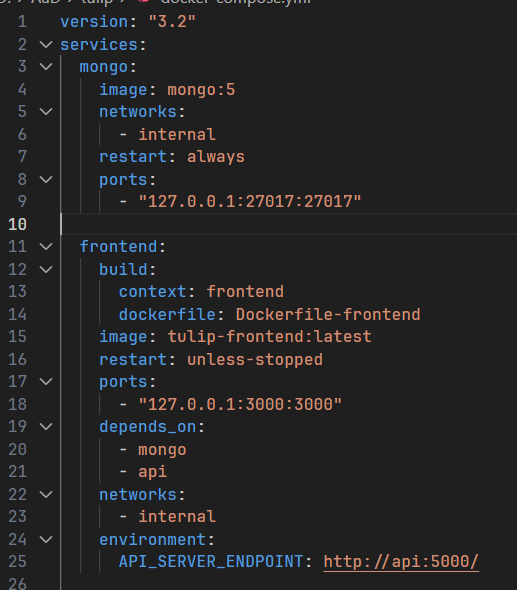 BIND TO localhost, or else no creds! Change to 127.0.0.1 in ports of frontend
Config path: services/api/configurations.py. Important:
1
2
3
4
5
...
vm_ip = '??'

services = [{"ip": vm_ip, "port": 9876, "name": "cc_market"},
            {"ip": vm_ip, "port": 80, "name": "maze"}]
Services can config on different VMs (IPs). Creating config (environment):
1
cp .env.example .env
Edit the .env file as below. Change tick length and game start time:
1
2
3
4
5
6
7
8
.env
---
# Start time of the CTF (or network open if you prefer)
TICK_START="2018-06-27T13:00+02:00"
# Tick length in ms
TICK_LENGTH=180000
# The flag format in regex
FLAG_REGEX="[A-Z0-9]{31}="
Change the assembler to use PCAP-over-IP in .env, which depends on how many VMs (e.g. services running on different VMs,…), see PCAP-over-IP.
1
2
3
.env
---
PCAP-over-IP=172.17.0.1:4242,172.17.0.1:<port_vm2>,...
Setup creds: See NGINX section.
PCAP-over-IP (99% secure)
Why localhost? It is PCAP-broker, which creates a SSH tunnel between host (running Tulip) and VM, which captures pcap. Pros:
- Secure (enemy cannot access this port)
- Tulip built-in support
Requirement: tcpdump on VM.
Clone the repo, cd to repo dir, and compile:
1
2
sudo apt install libpcap-dev
go build .
Run script on same PC running Tulip:
1
2
3
4
run_pcap.sh
---
#!/bin/sh
./pcap-broker -listen 172.17.0.1:4242 -cmd "ssh <user>@<VM> -oStrictHostKeyChecking=no tcpdump -ni eth0 -i game --immediate-mode -s 65535 -U -w - not port 22 and not port <code-server-port>"
Access host services from inside docker container, we bind to 172.17.0.1 (which is host.docker.internal), since Tulip runs inside container.
If you want to capture on another VM, run the script with different port from 4242.
++VPN (profile)s
Used to generate VPN profiles (not enough), in case we have to use for other machines (VPS). Didn’t have a chance to setup, TBA.
Firewall: iptables
Pretty much meh, not really using it, since we can just patch our services, which is the most obvious way to do if we know the payload (confirm from my team?).
Attack
Farmer: S4DFarm
Installing S4DFarm may error, something like related to Node lock file. Fix: go to server/docker/front/Dockerfile, add --no-frozen-lockfile to line RUN --mount=type=cache,id=pnpm,target=/pnpm/store pnpm install.
Up command is the same.
Documents is in the original DestructiveFarm though.
Client
Job: Run the actual sploit, submit flag to Farm server. Each laptop can run the sploit separately!
See example sploit script.
The only thing to do here is write your sploit, and run:
1
./start_sploit.py <your sploit>.py -u http://<farm_server_address:port>
Server
Job: collect flags from clients, submit to Game server, manage responses.
Clone and run the up command (see below).
Config path: server/app/config.py. IIRC, no need to rebuild to reload on changing some fields. Please DON’T restart if it works FINE. (celery (a component) is a pain in the ass, restarting the Server will take like 15 minutes to work (?)).
A&D scoreboard protocols: forcad, ructf,… if it is custom, just code it, in server/app/protocols.
1
2
3
4
5
6
7
8
9
10
11
12
13
14
15
16
17
18
19
20
...
CONFIG = {
    ...
    'SYSTEM_PROTOCOL': 'forcad_tcp', # depending on this, the below fields may be different
    'SYSTEM_HOST': '10.10.10.10',
    'SYSTEM_PORT': '31337',
    'TEAM_TOKEN': '???',
    ...
    # The server will submit not more than SUBMIT_FLAG_LIMIT flags
    # every SUBMIT_PERIOD seconds. Flags received more than
    # FLAG_LIFETIME seconds ago will be skipped.
    'SUBMIT_FLAG_LIMIT': 100,
    'SUBMIT_PERIOD': 2,
    'FLAG_LIFETIME': 5 * 60,
    ...
    # IMPORTANT. Restricting access to OUR farm.
    'SERVER_PASSWORD': '???',
    ...
}
...
I set submit period to be half of tick length, to make the Farm submit 2 flags in a tick, in case of sploit timeout…
Commands: Up and restart one component (api if config changed).
Setup creds. SERVER_PASSWORD in server/app/config.py
Code server
Most Linux distros (no Alpine): curl -fsSL https://code-server.dev/install.sh | sh
Alpine: docker run --name code-server -v /service:/home/vscode -e PASSWORD=blackpinkeruuu -e EUID=$(id -u) -e EGID=$(id -g) -p 8080:8080 martinussuherman/alpine-code-server (thanks to Khoa).
Docker useful
Commands:
- Up:
docker-compose up --build -d. - Restart one component:
docker-compose up --build -d api, in case ofapi. - For Vulnbox: Keep service running while rebuilding:
docker-compose up --build --force-recreate.
NGINX
Creating creds is usually enough, no need to blacklist IPs (as enemy IPs are usually hidden, behind a game server router).
Conclusion
From newbie experience with previous 2 A&D, initially Defense is not really important, as Attack gets you more points (and you can patch later if you find an sploit). Don’t try to setup all tools (?).
If you found an sploit, just run Farm client, blue team will do the rest.